AI agents in finance are really powerful when they have the right context, controls, and operating environment.
I (OnlyCFO) have been working closely with Brex for over 2 years, and what they’ve built for agentic finance (AF) is incredible. With Brex, agents handle all the tedious stuff, like expense reports, policy enforcement, and month-end close, so your team doesn’t have to. Check out Brex AF!
AI token spend is quickly becoming one of the largest vendor expenses, only behind salaries and maybe facilities.
So one of the highest ROI activities a CFO can do right now is to evaluate how the company can be more efficient with AI token spend. Not necessarily to cut AI usage, but to be more efficient with it.
I have talked to several engineers, CTOs, and people much smarter than me to develop this list on where to save on AI spend. I am biased but I think every CFO (and other leaders) should understand the ways to reduce AI model costs below.
1. Right Model for the Task
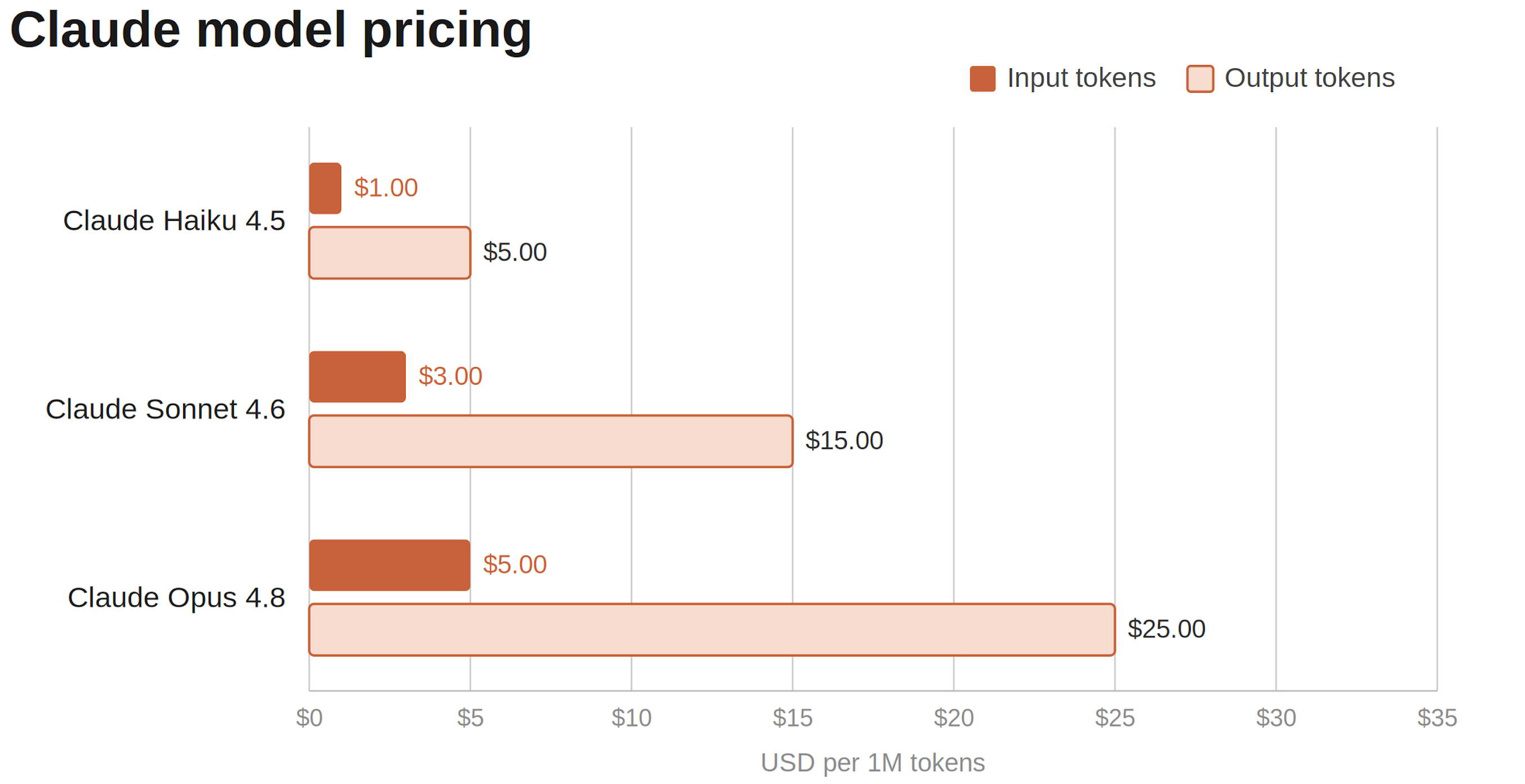
To understand the importance of the “right” AI model, you need to know the cost differences in these models.
If we use Claude as an example (the others are similar), the “smartest” AI model is 5x+ more expensive than the cheapest model. That means companies could be paying up to 5x more than necessary for many tasks.
The meme below summarizes the problem well…
There are LOTS of cases where the latest model is overkill for the task. If you tell Claude to use Opus 4.8 to rename files or update formatting in a board deck, it will.
This is where “model routing” comes in.
Model Routing = For each AI request, it decides which model should handle the task.
Model routing can be as simple as setting up some basic rules that define “IF this task type THEN use this AI model”. Or it can get as complicated as using an actual AI model to determine what AI model should handle the task.
Awesome! So how do I start model routing?
There are two different ways to use an AI model
Directly in App (Claude, ChatGPT, etc) - this is how most internal teams are using AI models.
Via API Calls - through another platform that sits between the user and the AI model. If you are selling an AI product, then it’s via API calls to the AI models.
Model routing basically only works if done via API calls. But many people (including me) wrongly assumed model routing wasn’t available for internal use, which is where a lot of AI spend occurs. That is not correct.
Company-Level Model Router: At a company level, you can add an “AI gateway” that sits between the AI models and the user. Instead of directly using Claude/ChatGPT, the AI gateway interface is where AI chats happen and it uses API calls. The AI gateway can then run your model router. You just need to build or buy an AI gateway…
Verticalized Model Router: Having a good model router is obviously important because you don’t want hard tasks going to a cheap model and screwing things up. So some model routers are built for types of people (like software developers). Maybe someday we’ll have model routers for every department...
Model Routing Savings Example:
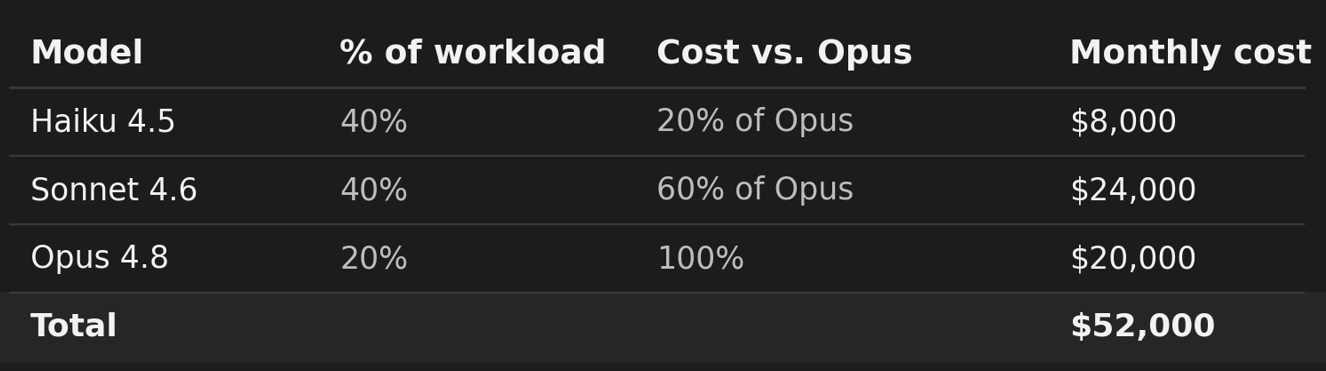
Let’s say you’re spending $100K/month on Claude:
You currently use Opus 4.8 (most expensive model) for everything, but if the company only used the model it actually needed for the task then it could look something like the below:
Opus is rarely needed for every task. So if users shifted to using Sonnet and Haiku when appropriate, the company could save nearly 50% ($576K per year)…
Model routing is getting quite good so the risk of routing to an incapable model can be pretty low if you set it up correctly.
2. Prompt caching:
I am not going to get deep into this because the important thing is for you to simply ask engineering “Are we prompt caching on repetitive tasks?”
If you’re sending the same large context on every API call (a system prompt, a reference document, a knowledge base), then you’re paying full input price every single time. Prompt caching stores that content so repeat calls cost ~90% less on the cached portion.
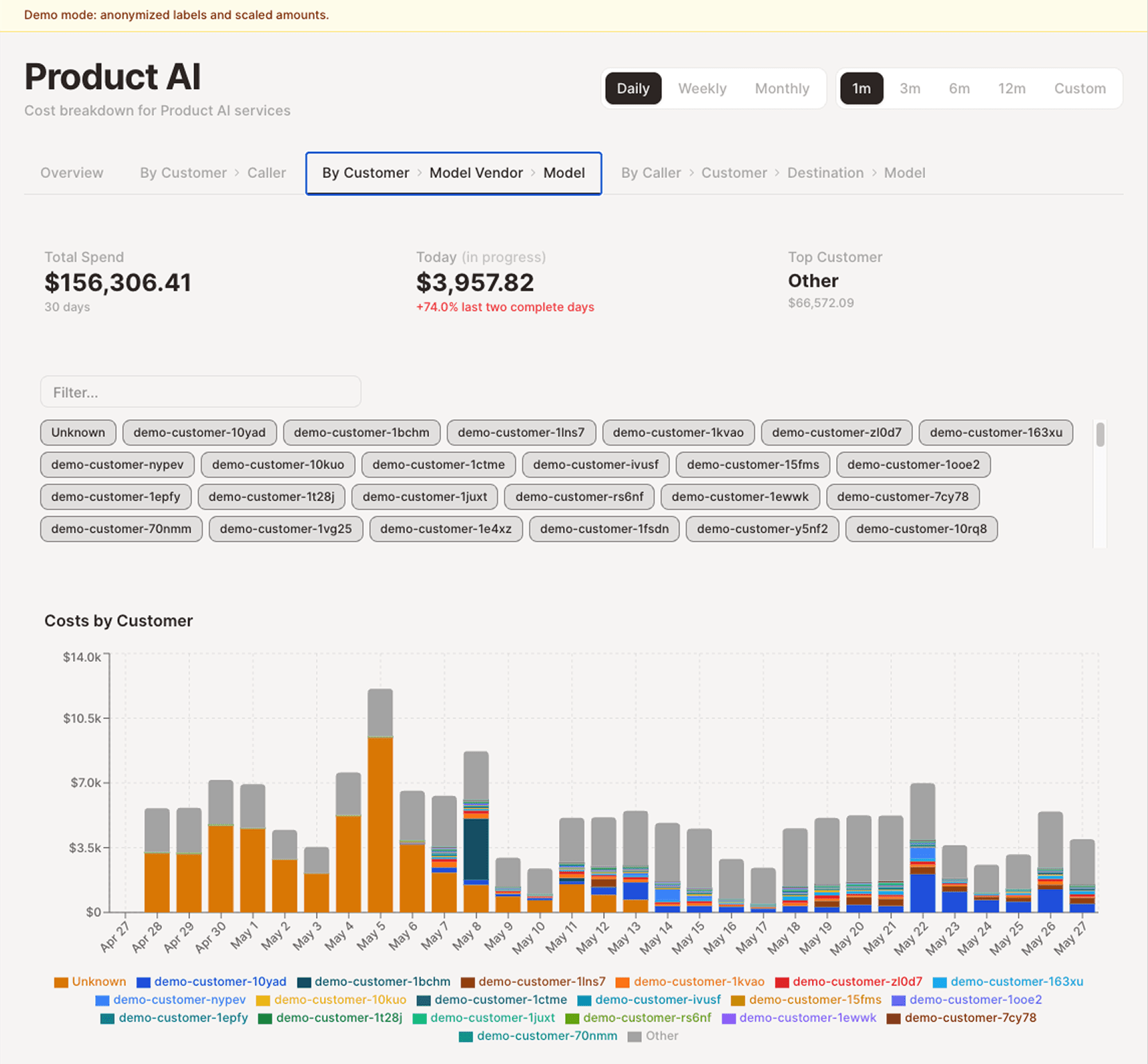
This is where data visibility becomes so important. If you can track token spend per API call then you can see what is burning a ton of tokens and often the recurring token-heavy tasks can be reduced a lot by caching.
3. AI Cost Visibility & Reporting
AI costs will soon be your largest vendor expense (if not already). As such, it’s important to be able to drill down into the costs and understand the drivers….
A couple of the big unlocks that come from AI spend reporting:
AI spend by employee by AI model.
Are employees using the most expensive model for simple tasks?
Help with forecasting AI spend by department
Are you allocating AI costs properly? AI spend needs to go to the right departments so department leaders are incentivized to control it.
AI spend per API call
What products/features are driving the highest AI spend?
If a task doesn’t need a real-time response, you can use the AI model’s “batch API” and save ~50% on token costs. A lot of stuff doesn’t need to be real-time so figure out where batching is fine because it can save significant money.
We did this exact thing with our ASC 606 agent. Our agent was reviewing every single contract as it was closed-won in SFDC. It reads our revenue policy, compares it to the contract terms, reviews our list of concerns, and then it documents the treatment and notifies us of any issues. We didn’t need this real-time. It was processing lots of contracts every day. So we batched them at the end of each day. And we stacked cost savings with prompt caching (#2 above) as well. We saved over 50% on the costs for this somewhat expensive AI task. And it took <1 hour to do.
5. AI Admin Controls
Set thedefault to the middle-tier model (e.g. Sonnet for Claude). If you are not using an internal model router, then at least do this. 90%+ of users will just use the default model. While they usually won’t be using the most expensive model, they will also almost never downgrade to the cheapest model. Just doing this will save you up to 40% (price difference between Opus and Sonnet) across most teams.
User Spend Limits: Put controls on users so they don’t create something that just blows up AI usage. Uber just limited developers to $1,500/month in token spend after they blew through their full-year AI budget in 4 months…Set a limit, even if it’s high, so nothing completely blows up. Then you can start to lower the spend limit later if you want.
6. Employee Education
Make sure employees understand this stuff. Most employees just don’t know how to be efficient with AI spend yet. Some examples (in addition to everything above):
New topic = new chat. Each time you prompt in the same chat window, it re-reads the entire chat history. This gets expensive quick (especially if you are on a premium model). I have seen people just default to the same chat window every time they go to AI…
Be upfront with everything you need in one prompt. Back-and-forth exchanges compound quickly. Every reply re-reads the full history. Give Claude the full context and ask for exactly what you want in one shot.
Update the AI model in your automations, agents, skills, etc. A lot of scheduled tasks are structured and repetitive (often fine for a cheaper model). Users can define which AI model to use in agents/skills/automations. Test out a lower tier model and see if it works fine. This is like model routing but it’s manual since there is no automatic solution.
Output token discipline. Output (AI responses) costs 5x input (user prompts). Asking for detailed responses, not capping responses, letting agents narrate every step will all multiply the expensive side of the bill. Telling models to be concise and setting hard output limits is close to free and underrated.
Final Thoughts
Every CIO and CFO I have talked to recently said the same thing about “tokenmaxxing”:
Tokenmaxxing served its purpose. We wanted to push AI adoption as fast as possible and get employees using the tools that would get us ahead.
Now it’s time for us to drive efficiency in that spend and ensure we are creating real ROI.
It’s time to be efficient with AI. Not slow people down necessarily. But be efficient. Start being efficient now before you have to start making harder cuts (like people or setting hard token limits).
The goal is not to cut AI usage, but to be more efficient with it and drive real ROI.
Footnotes:
Check out Magpie to see the kind of AI visibility and reporting Brex is building and for a deeper look into the complexities of AI cost analysis.
I cover a lot more AI stuff under my new newsletter (CFOpilot). Subscribe
Subscribe and share this post with your finance teams. They need to understand this stuff.




This is really helpful! Thank you
There is a tool that addresses the subject of the post. I've tried, and it is powerful: https://prismon.ai/